A free application tracker for spring weeks, internships and grad schemes.
An Excel and CSV template that keeps every application in one sheet, from the day a scheme opens to the offer. Download it and start, no email needed.
§ 01The templateFree, no sign-up
Download the tracker.
One row per application, a dropdown for each stage, and four grey example rows to show how it's filled in. Delete those and it's yours.
For Excel, Google Sheets or Numbers
Two tabs: a short How to use, and the tracker itself. It has dropdowns for the stage and the programme type, a header that stays put as you scroll, filters on every column, and a next step that turns red once its date has gone.
Download the .xlsxAs plain text, for anything else
The same sixteen columns and example rows, with no formatting. Use it if you'd rather build the sheet your own way, or bring it into Notion, Airtable or any app that imports a CSV.
Download the .csvIn Google Sheets, choose File, Import, Upload and pick the .xlsx, so the dropdowns come with it. The example firms are made up, and every one of them starts with "Example".
| Firm | Role | Programme type | Deadline | Date applied | Stage | Test or HireVue due | Next step | Next step date |
|---|---|---|---|---|---|---|---|---|
| Example Bank | Spring Week 2027 | Spring week | 05/10/2026 | HireVue to complete | 03/11/2026 | Take the HireVue | 01/11/2026 | |
| Example Consulting | Summer Internship 2027 | Internship | 16/11/2026 | 01/10/2026 | Interviewing | Practise two case interviews | 04/11/2026 | |
| Example Insurer | Industrial Placement 2027-28 | Placement year | 01/12/2026 | 02/10/2026 | Applied | Chase if no reply (three weeks) | 23/10/2026 | |
| Example Asset Management | Graduate Scheme 2027 | Grad scheme | 30/11/2026 | Not applied | Write the cover letter | 10/11/2026 |
§ 02The columnsWhat goes where
What each column is for.
Firm and Role are the two that matter. Fill in the rest as you go, and leave anything blank that doesn't apply yet.
| Column | What goes in it |
|---|---|
| Firm | Who you're applying to. |
| Role | The scheme's name as the firm advertises it, such as Summer Internship 2027. |
| Programme type | Spring week, insight day, internship, placement year or grad scheme, from the dropdown. |
| Sector | However you group firms: banking, consulting, law, tech. |
| Location | The office or city. |
| Opens | When applications open. |
| Deadline | When they close. Leave it blank for a rolling scheme and say so in Notes. |
| Date applied | The day you sent it. The three-week follow-up counts from here. |
| Column | What goes in it |
|---|---|
| Stage | Where it stands, from the dropdown, or in your own words. |
| Test or HireVue due | The date an online test, HireVue or other assessment has to be done by. |
| Interview date | The day of an interview or assessment centre. |
| Next step | The one thing you'll do next for it, like "Write the cover letter". |
| Next step date | When you'll do it. It turns red once the date has gone. |
| Contact | A recruiter's email, or someone you met at a careers fair. |
| Link | The job advert or the application portal. |
| Notes | Which CV and cover letter you sent, "Rolling", and anything else worth remembering. |
§ 03How to use itStages, dates and chasing
How to track your applications in one sheet.
Add a row as soon as you find a scheme
Put the firm, the role and the deadline in before you've written a word of the application, and set the stage to Not applied. Spring week applications usually open in late August or early September, and most close in December or early January (Warwick Business School), so a list started in September gives you the whole autumn to work through it.
The tracker is for the applications you're making, so it doesn't list openings. For those, look at Trackr, Bright Network and the careers pages of the firms you're interested in.
Move it through the stages
Most graduate applications follow a similar path, though not every firm uses every step. After you apply you're usually sent an online test or a HireVue (a recorded video interview), then come interviews, sometimes an assessment centre, and finally an offer or a rejection. Change the stage each time you hear something. If your own wording suits you better, such as "Submitted, HireVue to do", type that instead.
- To sendNot applied
- Waiting on youAssessment to completeHireVue to complete
- Waiting on themAppliedAssessment completedHireVue completedInterview completedAssessment centre completed
- In interviewsInterviewingAssessment centre
- OfferOfferAccepted
- ClosedRejectedNo replyMissed deadlineWithdrawn
Give every test and interview a date
Online tests and HireVues come with a date to finish them by, and they're easy to leave until the night before. Put that date in Test or HireVue due, then add the test to your calendar or to-do list as a task of its own, with a time set aside to sit down and do it. Treat interviews and assessment centres the same way. The day goes in Interview date, and the preparation gets its own slot a few days before.
Chase after three weeks
If three weeks go by after you apply and you've heard nothing, send one short, polite email to the graduate recruitment team asking where your application has got to. Put it in Next step with a date when you send the application, so you don't have to remember it. If there's still no reply after that, set the stage to No reply and put your time into the applications that are still moving.
With a rolling deadline, apply early
Many schemes recruit on a rolling basis. The firm reviews applications as they come in and closes the scheme once the places are filled, which can be well before the date on the advert. When a scheme says it's rolling, write "Rolling" in Notes and treat it as more urgent than one with a fixed closing date. Sending it in the first few weeks after it opens is the safest choice.
Write down what you sent
Use Notes for which version of your CV and cover letter went where, so that when an interview comes up weeks later you know what they've read. If you're still putting those together, there's a guide to a one-page CV for spring weeks, internships and grad schemes, and another on writing a cover letter for finance and consulting.
Also free: the degree classification calculator, for what you need on the rest of your degree for a First or a 2:1.
§ 04Questions7 answered
Application trackers, answered.
01How do I track my job applications?
Keep one row per application in a spreadsheet, with the firm, the role, the deadline, the date you applied, the stage it's at and your next step. Change the stage each time you hear back, and give every test, HireVue and interview a date of its own. The free template on this page is set up that way, with a dropdown for each stage.
02What should an internship or spring week tracker include?
At the least, the firm, the role, the programme type (spring week, internship, placement or grad scheme), when applications open and close, the date you applied and the stage. Columns for test and interview dates, a next step with its own date, a contact, the link and your notes make it much easier to keep on top of. This template has all of them.
03Is there a free job application tracker template for Excel or Google Sheets?
Yes. The tracker on this page is free to download, with no email or sign-up. The .xlsx file opens in Excel, in Google Sheets (File, Import, Upload) and in Numbers, and the .csv works with anything that imports a spreadsheet.
04How long should I wait before following up on an application?
About three weeks. If you've heard nothing three weeks after applying, send one short, polite email to the firm's graduate recruitment team asking where your application stands. If there's still no reply, mark it No reply and spend your time on the applications that are still moving.
05What does a rolling deadline mean?
The firm reviews applications as they arrive and closes the scheme when the places are filled, which can be before the closing date it advertises. Apply to rolling schemes as early as you can, and write Rolling in the tracker's Notes so you know to treat them as urgent.
06What are the stages of a graduate application?
Most go from the application to an online test or a HireVue (a recorded video interview), then one or more interviews, sometimes an assessment centre, and then an offer or a rejection. Not every firm uses every step. The tracker's Stage list has one for each, plus No reply, Missed deadline and Withdrawn for the ones that close without an answer.
07Can I import this tracker into Ritual?
Yes. On Ritual's Applications page, choose Import your sheet and pick the file, or paste a Google Sheets link shared as anyone with the link can view. Ritual reads your own wording for each stage, and importing again later updates what's there without doubling it. Ritual is in beta, and the waitlist hears first when places open.
§ 05RitualKept up to date
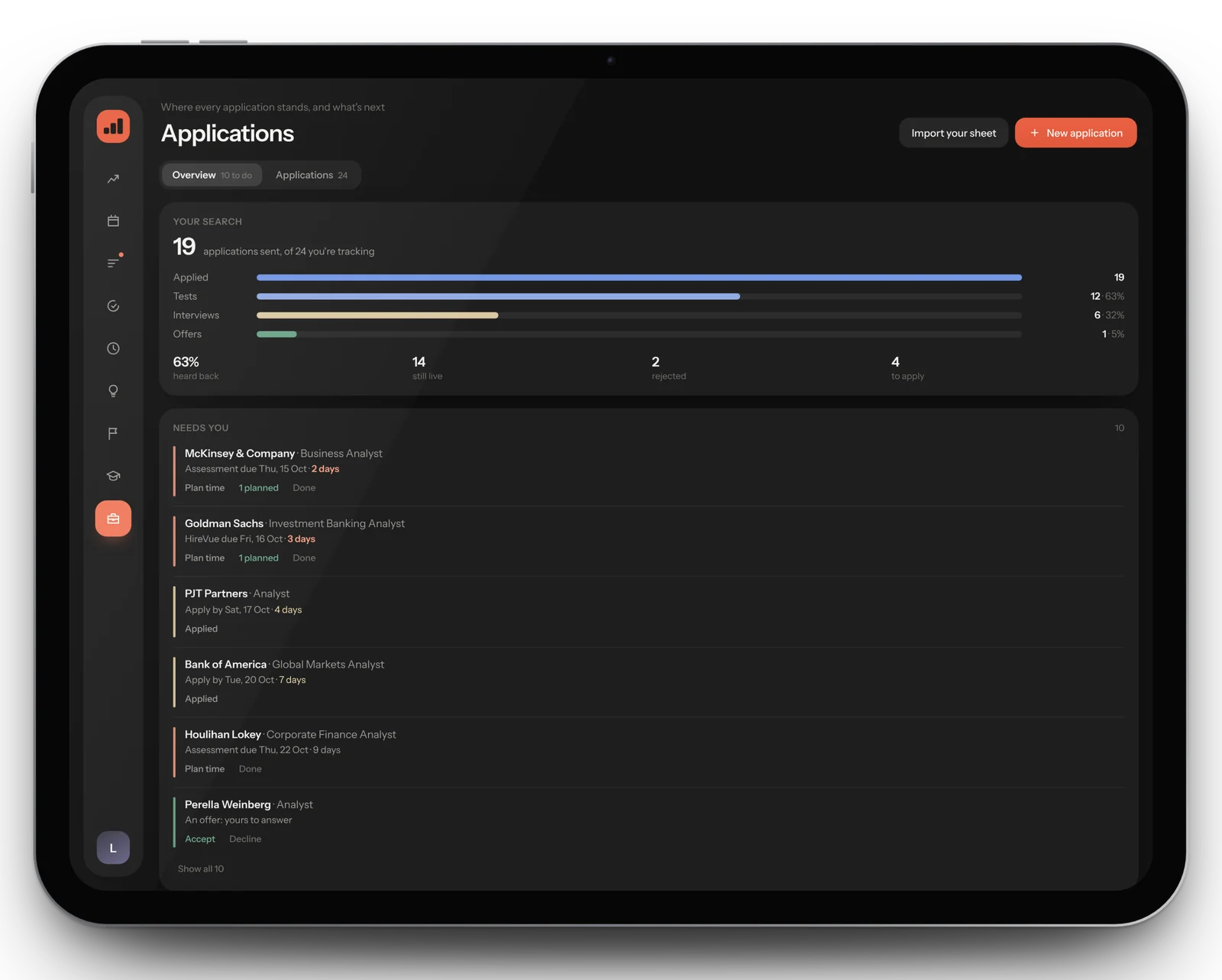
Ritual's Applications page does this for you.
Import this sheet, or the one you already keep, and Ritual reads your own wording for each stage. Import it again whenever it changes and it updates what's there without doubling anything. Then it works out what needs you next.
- Needs you, most pressing first: tests and HireVues to do, deadlines in the next two weeks, offers to answer, interviews, and anything you applied to three weeks ago without a word back
- Plan time for a test, HireVue, interview or assessment centre from its row, and ticking off that task moves the application on by itself
- Closing dates and test deadlines on your calendar, next to the rest of your week
- Your search as a funnel, from applied to tests, interviews and offers, with a bar for each category
- Habits, tasks and a daily share price in play money, to keep you going through application season