
Applying for spring weeks, internships and graduate schemes means a lot of small deadlines landing at once. An online test arrives after you apply, a video interview invitation comes with its own window, and some firms go quiet for weeks. This guide is about keeping all of that in one place so nothing slips past you, whichever tool you use.
- Give every application one row, with a stage and a next step that has a date on it.
- Twelve columns cover almost everything, and the stage and next-step columns do most of the work.
- Rolling deadlines fill as applications arrive, so set your own target date for each one ahead of the advertised close.
- Plan online tests and video interviews as real blocks of time in your calendar, not as reminders.
- If you've heard nothing three weeks after applying, send one polite follow-up, then mark it and move on.
- Look at the whole tracker once a week and keep it short enough that you will.
01Why track your applications?
Tracking matters because you're likely to send a lot of applications, each with its own deadlines and stages, and keeping them straight is down to you. The Institute of Student Employers' 2026 survey found 141 applications for every graduate role, and 172 in London [1].
The same survey found applications for internships rose 27% in 2025/26 while employers' internship and placement hiring fell 8% [1]. Commentary on the survey also points to employers shortening their application windows and limiting how many roles one person can apply for at a single firm [2]. All of that means more applications, each open for less time, and less room for a missed test or a deadline you thought was next week.
A tracker solves the memory problem. It also shows you patterns you won't spot otherwise, such as the stage where most of your applications stop.
02What columns should a job application tracker have?
A job application tracker needs one row per application and columns for the firm, the role, the programme type, the link, when applications open and close, the date you applied, the stage, any test or interview date, the next step with its date, a contact and notes. The stage and the next step are the two that keep it useful.
| Column | What goes in it | Why it matters |
|---|---|---|
| Firm | The employer's name | So you can sort and search |
| Role | The programme's own name, such as "Spring Insight Programme 2027" | Firms run several programmes, and some limit you to one |
| Programme type | Spring week, insight day, internship, placement year or grad scheme | Lets you see each kind of search on its own |
| Link | The listing or the firm's portal | You'll go back to it more often than you think |
| Opens | When applications open | So you can apply in the first weeks of a rolling process |
| Deadline | The closing date, or "Rolling" | The date you're working back from |
| Date applied | The day you submitted | Starts the clock for following up |
| Stage | Where it stands now (see the next section) | Tells you whose move it is |
| Test or HireVue due | The deadline for any test or video interview | The date that's easiest to miss |
| Next step and date | The one thing you'll do next, and when | Turns the tracker into a to-do list |
| Contact | Anyone you met or emailed at the firm | For follow-ups and interview prep |
| Notes | Which CV and letter you sent, and anything you learnt | So an interview doesn't catch you out |
The notes column earns its place at interview. If you've tailored your CV or written a cover letter for a firm, note which version went where, so you're not caught out when someone asks about a line you've since rewritten. If you're still building the CV itself, the one-page CV guide covers it, and if a placement year is on your list, the placement-year guide covers what the year itself is like.
Some forms ask about your education in detail [4], so keep your grades somewhere you can find them. The degree calculator keeps a running average as marks come back, and the degree classifications guide explains how those marks turn into a class.
03The stages of an internship or graduate application
Most internship and graduate scheme applications go through the same stages: you apply, take online tests, record or attend a first interview, go to an assessment centre or final round, and then get an offer or a rejection. The order of the early stages varies by firm, and some tests come back again at the assessment centre [4] [5].
TargetJobs describes the usual sequence for a graduate scheme as an application form, psychometric tests, a first-round video interview (live or pre-recorded), an assessment centre with group exercises, a presentation and an interview, and then an offer [4]. Spring weeks use a shorter version of the same process [6], which spring weeks explained goes through.
For tracking, it helps to split each step into two, with one stage while it's waiting on you and another once you've done it. Ritual's own list of stages works that way.
| Stage | Whose move |
|---|---|
| Not applied | Yours |
| Applied | The firm's |
| Assessment to complete | Yours |
| Assessment completed | The firm's |
| HireVue to complete | Yours |
| HireVue completed | The firm's |
| Interviewing | Yours, until it's done |
| Interview completed | The firm's |
| Assessment centre | Yours, until it's done |
| Assessment centre completed | The firm's |
| Offer | Yours, to accept or decline |
| Accepted, Rejected, No reply, Missed deadline or Withdrawn | Closed |
The split makes the weekly review quick. Filter for the stages that are your move, and that's your list for the week. Everything else is waiting on someone else.
04How rolling deadlines work
A rolling deadline means the firm reviews applications as they arrive and offers places as it goes, closing the programme once it's full. The advertised closing date is the latest you could apply, and places may be gone well before it [5] [6].
The University of Edinburgh's careers service notes that many graduate schemes close before Christmas of your final year, while others recruit on a rolling basis until they're full [5]. For spring weeks, TargetJobs says some employers fill places with good candidates before the deadline and close early, and advises applying as early as you can [6].
In the tracker, write "Rolling" in the deadline column and give yourself a target date of your own, a few weeks after the opening date, then treat that as the deadline. The Opens column is what makes this work. If you know a firm opened its programme on 1 September last year, you can be ready with a CV and a draft answer to "why us?" when it opens again.
05Plan tests and video interviews as tasks
Online tests and video interviews are the deadlines that slip most easily, because they arrive by email after you've applied and each one has its own window. Put each one in your calendar as a block of real time on a specific day, well before the deadline, instead of leaving it as a reminder.
Applications take longer than people expect. Exeter's careers guide puts a full application, tests included, at anything from a couple of hours to four or five [7]. It describes a common video interview format as around ten questions, each with 30 seconds to think and 90 to 120 seconds to answer, to be completed within a window set by the firm [7]. Give yourself time to set up somewhere quiet and do a practice question first.
When a test invitation lands, change the stage to "Assessment to complete" or "HireVue to complete", put the deadline in the due-date column, and set the next step as the block of time you've planned, with its date. If you plan your days in advance, the method in how to plan your day works for this too: give the task its real length and put it in a slot, not on a list.
06When to follow up on an application
If you've heard nothing three weeks after applying, a reasonable rule of thumb is to send one short, polite follow-up and then mark the application "No reply" if there's still nothing. Treat three weeks as a habit for keeping your tracker honest, since firms' timelines vary a lot.
The whole process for a graduate scheme can take several months from start to finish [5], so silence early on isn't always bad news. If the firm has an applicant portal, check your status there before you email. If you do write, use the recruitment address from your confirmation email, give the programme's exact name and the date you applied, and ask whether there's an update on timing. Keep it to a few lines.
Then let it go. An application marked "No reply" stays in your tracker, so if the firm does come back, you'll know exactly what you sent.
Track rejections too, with the stage they came at. If most of yours end after the online tests, practice tests are the fix. If they end after interviews, your answers need the work. You can only see that pattern if the rejections are written down.
07How many applications should you send?
There's no right number, and it's better to decide how many you can do well each week than to aim for a total. The ISE's head of insights advises treating a job search like a job, with applications that are "authentic, considered and tailored", and "a focus on quality not quantity" [3].
The ISE has also found that students using AI to write applications are sending more of them, which drives up competition for each role [3]. So sending more doesn't necessarily improve your chances, because everyone else is sending more too.
A practical way to set your number is to work from your time. If one careful application takes two to five hours [7] and you can give your search six hours a week alongside your degree, that's two or three good applications a week, plus the tests and interviews that follow. Your tracker tells you whether that's working. If you're getting to interviews, keep going at that pace. If you're not, spend the time on fewer, better applications.
08A weekly review of your applications
A weekly review is ten or fifteen minutes where you go through every open application, update its stage, and make sure each one has a next step with a date. It's the habit that keeps a tracker accurate, and the Sunday reset is a good place for it.
In that guide I described putting the week on the calendar on a Sunday: "I block out the important events, line the work up against its deadlines, and check the applications and university pages so I know exactly what's coming up." For applications, that means sorting by the due-date and next-step columns, putting every test and interview for the coming week into the calendar, and moving anything three weeks old with no reply to a follow-up.
Keep the tracker small enough that the review stays quick. If you've added columns you never fill in, delete them.
09How to track spring week applications
Track spring week applications the same way as any other, with one row each, and add the programme's dates and the year of study it's for. Many spring weeks fill on a rolling basis [6], so the Opens column and your own target date matter more than usual.
Spring weeks bring a few extra things to note. Some firms limit how many of their programmes one person can apply for [2], so note which division you chose. Note any fast-track the firm offers to its summer internship, since that tells you which internship applications you might be invited to skip a year later. And keep the contacts you meet on the week in the contact column. Spring weeks explained covers the programmes themselves.
10Spreadsheet, Notion, Trackr or an app?
Any tool works if it has one row per application, a stage and a next step with a date, and you look at it every week. The real differences are how much setting up it needs and whether it reminds you when something is due.
| Option | Good for | Watch out for |
|---|---|---|
| Spreadsheet (Excel or Google Sheets) | Free, quick to start, and easy to sort and filter | No reminders unless you build them, and dates live apart from your calendar |
| Notion or a similar database | Views by stage or by deadline, and notes alongside each row | Easy to spend more time designing the page than applying |
| Trackr | Finding openings, with alerts when programmes open | Alerts for every programme can be a lot, so filter to the firms you care about |
| A planner app with an applications page, such as Ritual | Deadlines on your calendar, and tests planned as tasks in your day | Ritual is in beta, so for now it's waitlist only |
Trackr is best thought of as where you find openings. It tracks new spring weeks, internships and graduate roles as they go live. Your own tracker is where you keep the decisions you've made and what happens next, and many people use both. You can see how Ritual's version works on the Applications page of the homepage.
11How Ritual helps
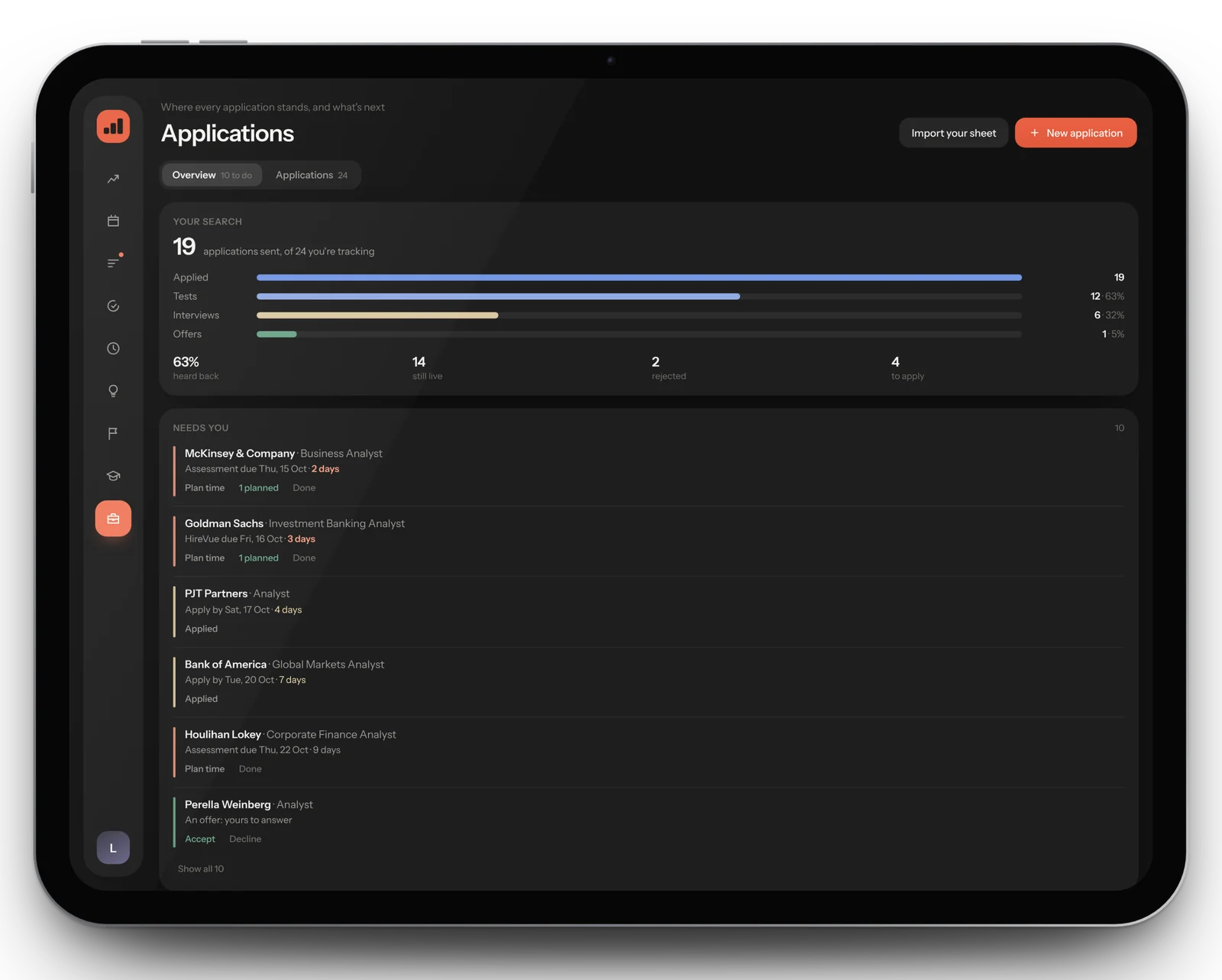
Ritual's Applications page is the tracker in this guide, joined up with your calendar and your day. Choose Import your sheet and bring in the spreadsheet you already use, from a Google Sheets link, an Excel file or a CSV. It reads your sheet's own wording for each status, and importing again updates what's there without doubling it. The table runs in the order a search goes, from To apply through Assessments, HireVues, Interviews and Assessment centres to Offers and Closed, and each row's countdown changes colour within a week of its date and again within three days.
- A "needs you" list: tests and HireVues to do, deadlines in the next two weeks, offers to answer and anything applied to three weeks ago with no word
- Plan time on any test, HireVue, interview or assessment centre from its row: it becomes a task in your day, and ticking it off moves the application on
- Type a task like "HireVue prep for Goldman" and Ritual asks whether it belongs to that application
- Closing dates and test deadlines on your calendar, and your search as a funnel from applied to offers
Ritual is in beta. Join the waitlist and you'll hear first when places open.
12Questions, answered
01What should I put in a job application tracker?
One row per application, with the firm, the role, the programme type, a link, when applications open and close, the date you applied, the stage, any test or interview date, the next step with its date, a contact and notes on which CV and cover letter you sent. The stage and the next step with a date are the two that matter most.
02How do I keep track of spring week applications?
The same way as any other application: one row each, with the stage and a dated next step. Add the programme dates and when applications opened, because many spring weeks fill on a rolling basis, and note any fast-track to the firm's summer internship.
03How long do graduate employers take to reply?
It varies a lot by firm. A full graduate scheme process can take several months from start to finish, so a quiet few weeks isn't always bad news. A reasonable rule of thumb is to send one polite follow-up if you've heard nothing three weeks after applying.
04Should I track rejections?
Yes, along with the stage each one came at. If most of your applications stop after the online tests, practise tests. If they stop after interviews, work on your answers. You can only see that pattern if the rejections are written down.
05How many applications should I send?
There's no right number. Work out how many careful applications you can do each week alongside your degree, since one can take from a couple of hours to four or five, and use your tracker to see whether they're reaching interviews. Quality matters more than volume.
06What's the difference between an application tracker and Trackr?
Trackr is mainly a place to find openings, with alerts when spring weeks, internships and graduate roles go live. Your own application tracker records what you've applied to, where each one stands and what you'll do next. Many students use both.
07Should I use a spreadsheet or an app to track applications?
Either works if it has one row per application, a stage and a dated next step, and you review it weekly. A spreadsheet is free and flexible but won't remind you of anything. An app can put deadlines on your calendar and turn tests into tasks in your day.
13Sources
All accessed 27 October 2026.
- Times Higher Education, "Employers cut student work experience roles as demand rises" (14 October 2026), reporting the ISE Student Recruitment Survey 2026
- Wonkhe, "ISE's 2026 student recruitment survey paints a picture of a graduate job market in flux" (13 October 2026)
- Wonkhe, "Graduate jobs and recruitment reality", Claire Tyler, Head of Insights at the Institute of Student Employers (15 October 2025), on the ISE Student Recruitment Survey 2025
- TargetJobs, "What is the recruitment process for graduates?"
- University of Edinburgh Careers Service, "Understanding the UK recruitment process"
- TargetJobs, "What is a spring week, insight day or insight programme?" (2 May 2025)
- University of Exeter Business School careers, "Investment Banking Spring Weeks" (PDF, Opening City Doors)
Something here out of date, or a question the guide doesn't answer? Email hello@getritual.app. More in Guides.